

Redact legal documents without uploading them to the cloud.
Cloud-based document redaction for law firms involves uploading privileged, confidential information to a third-party server, a serious risk. Once you click upload, the file leaves your control, passing through infrastructure that may log, cache, or store your documents, which you cannot audit.
Secure Redaction eliminates this risk. It is a secure document redaction tool that is completely client-side, powered by Rust and WebAssembly. Your legal documents never leave your browser. The entire operation—from PII detection to permanent removal—executes locally at near-native speed. When you close the tab, no data was transmitted, stored, or logged.

Legal redaction is not the same as general document redaction
Standard redaction tools used by HR or marketing lack the rigor required for legal practice. When a firm redacts a Social Security number, they handle information protected by attorney-client privilege and ABA Model Rule 1.6. Unlike general software, legal document redaction requires a guarantee that sensitive client data is never exposed to third-party vendors. A failure here isn't just a data breach; it's a malpractice risk and a breach of ethical obligations.
Most redaction software for law firms follows a cloud model, forcing you to upload privileged files to external servers. This workflow creates unacceptable risks: you lose custody of client data, potentially violating state bar confidentiality rules, and you become dependent on a vendor's security posture. For sensitive matters like immigration cases or trade secret litigation, uploading files to the cloud is a risk attorneys cannot afford.
Secure Redaction eliminates these risks through client-side processing. Powered by Rust and WebAssembly, the entire operation runs in your browser. No file uploads, no server roundtrips, and no third-party custody. Your documents remain on your machine, ensuring attorney-client privilege is architecturally preserved.
WHY SECURE REDACTION OUTPERFORMS CLOUD-BASED ALTERNATIVES
Most redaction tools were built for enterprise compliance departments and repurposed for legal. Secure Redaction was built from the ground up for law firms — for the specific confidentiality requirements, ethical constraints, and workflow realities of legal practice. The architecture is fundamentally different from every cloud-based competitor, and that architectural difference is why it works where cloud tools create risk.

Client-side processing: your documents never leave your browser
Client-side processing is the foundational differentiator. Cloud-based redaction tools like Redactable, iDox.ai, and RedactifyAI require you to upload legal documents to their servers. This transit risks attorney-client privilege as files reside on infrastructure you don't control, governed by vendor logging and data retention policies. For sensitive immigration cases or sealed filings, this trust introduces unacceptable ethical risks.
Secure Redaction eliminates uploads entirely. Powered by Rust and WebAssembly, the tool executes within your browser's sandbox. Documents are processed locally in memory; no data touches a network or server. This architecture ensures zero persistence and zero transmission, architecturally preserving third-party custody boundaries and document security.

Rust and WebAssembly: near-native speed without native installation
JavaScript-based tools often struggle with large legal documents, causing slow processing or browser crashes. Secure Redaction uses Rust—a language built for speed and memory safety—compiled to WebAssembly. This allows our tool to achieve near-native performance directly in your browser without any installation.
This efficiency means a ten-page PDF processes in under three seconds, and even hundred-page production sets finish in less than thirty. Beyond speed, Rust’s memory safety eliminates common bugs like buffer overflows and leaks that plague other redaction software for lawyers. The result is a stable, high-performance tool that handles real-world legal document volumes with ease.

Built for legal workflows, not retrofitted from enterprise compliance
Generic tools treat document redaction as a volume problem, often flagging irrelevant data. Legal redaction is a precision problem. Attorneys must remove Social Security numbers and dates of birth while preserving critical case citations, court dates, and attorney names. Secure Redaction is built for this legal-specific accuracy, ensuring automated PII detection serves the workflow rather than creating more manual review.
Our tool detects common PII patterns for quick confirmation while providing manual tools for signatures and handwritten notes. Unlike visual overlays, our redaction is permanent; text is stripped from the document structure and metadata is scrubbed. This ensures total redaction permanence, meeting the strict standards of court filing requirements and discovery production rules.

Zero-install deployment that IT departments actually approve
Desktop redaction software for lawyers—like CaseGuard or Adobe Acrobat Pro—imposes high costs, including per-user licensing, complex IT installation, and ongoing maintenance. For a 20-attorney firm, managing dozens of seats and ensuring compatibility with existing stacks creates a significant IT support burden.
In contrast, Secure Redaction runs in any modern browser with zero installation. New associates can start redacting documents instantly without configuring license servers. Because it processes files entirely client-side with no server component, it bypasses complex vendor security questionnaires and cloud infrastructure vetting, making it the ideal secure document redaction tool for firms seeking operational efficiency.
Redaction use cases across practice areas
Every law firm handles confidential documents. The specific redaction requirements vary by practice area, but the underlying need is universal: sensitive information must be permanently removed before a document is filed with a court, produced in discovery, shared with opposing counsel, provided to a third-party expert, or stored in a less-secure system. These are the most common use cases we see across the practice areas we serve.

Immigration law — Asylum applications, visa petitions, and USCIS filings
Immigration filings contain highly sensitive PII, including alien registration numbers and traumatic personal declarations. Sharing these with experts or translators requires robust document redaction for law firms to protect client safety. Traditional cloud-based legal document redaction tools risk exposing asylum history to third-party servers. Secure Redaction’s client-side processing eliminates this, ensuring sensitive immigration records never leave your browser.

Criminal defense — Discovery productions, police reports, and sealed records
Criminal defense firms handle documents that must never be uploaded to third-party servers, including sealed grand jury materials, confidential informant identities, and juvenile records. When producing discovery or sharing reports with experts, firms must redact information protected by court order or ethics rules. Client-side redaction ensures these materials are never transmitted to the cloud, architecturally guaranteeing compliance with protective orders rather than relying on a vendor’s promise.

Personal injury — Medical records, insurance documents, and settlement agreements
Personal injury firms must redact HIPAA-protected health information, SSNs, and policy numbers from medical records before sharing them with experts or opposing counsel. The high volume of documents in PI cases makes processing speed a necessity. Secure Redaction’s Rust/WASM engine handles large medical record sets in seconds, ensuring efficient legal document redaction without the delays of traditional browser tools.

Family law — Financial disclosures, custody evaluations, and psychological reports
Family law involves complex confidentiality, from financial disclosures and tax returns to sensitive custody evaluations and minor records. Attorneys must redact non-relevant PII while preserving essential data for mediators or experts. Unlike blunt automated tools, Secure Redaction’s precision workflow allows paralegals to redact Social Security numbers while keeping critical income figures visible, ensuring secure document redaction that respects the specific needs of family law litigation.

Bankruptcy — Means test filings, creditor matrices, and asset schedules
Public bankruptcy filings require redacting sensitive PII like Social Security, bank account, and credit card numbers to prevent identity theft. However, law firms must retain complete identifiers for sealed companion filings. Secure Redaction supports this dual-output workflow, allowing attorneys to redact legal documents for public record while preserving the original for sealed filings—all without uploading privileged data to a cloud server.
How Secure Redaction works
Four steps. No upload. No account required.
Open the tool in your browser
Navigate to secureredaction.com in any modern browser — Chrome, Firefox, Edge, or Safari. There is nothing to install, no account to create, and no login required. The tool loads the Rust/WebAssembly engine automatically. You are ready to redact in seconds.
Select your document
Click to select a PDF from your local file system or drag and drop it into the browser window. The file is read into your browser’s local memory. It does not leave your device. There is no upload progress bar because there is no upload. The document appears in the viewer immediately.
Review and apply redactions
The tool scans the document for common PII patterns and highlights detected instances for your review. Confirm the detections you want to redact and dismiss any false positives. Use the manual selection tool to draw redaction boxes over any additional content — names, addresses, case-specific identifiers, handwritten notes, signatures, or any other information that needs to be permanently removed. Each redaction is previewed in real time so you can see exactly what the output will look like before you finalize.
Download the redacted document
Click to generate the final redacted PDF. The underlying text is permanently stripped — not covered with a black box, but actually removed from the document structure. Metadata is scrubbed. The output file is saved to your local disk. When you close the browser tab, the original document, the working file, and the redacted output are all released from browser memory. Nothing remains. Nothing was ever transmitted.

Stop uploading privileged documents to someone else’s servers.
Every cloud-based redaction tool asks you to trust a third party with your client’s most sensitive information. Secure Redaction asks you to trust your own browser. The tool is free to try, runs in seconds, and leaves zero trace. Your documents stay on your device. Your confidentiality obligations stay intact. Your IT department has nothing to evaluate because nothing is transmitted.

What makes client-side redaction different from cloud-based redaction
The distinction between client-side and cloud-based redaction is not a marketing label. It is an architectural difference that changes the security model, the confidentiality risk, the compliance posture, and the performance characteristics of the tool. Below we explain each dimension so you can evaluate whether your current redaction workflow meets the standards your ethical obligations require.
What does “client-side processing” actually mean, and why does it matter for attorney-client privilege?
Client-side processing means the computation happens inside your web browser, on your machine, using your CPU and your RAM. The document is never transmitted over the internet. There is no API call to a remote server. There is no server at all. The Rust code that performs the redaction has been compiled to WebAssembly — a binary instruction format that modern browsers can execute at near-native speed — and it runs entirely within the browser’s sandboxed execution environment.
For attorney-client privilege, this architecture eliminates the transmission risk that cloud-based tools create. When you upload a document to a cloud redaction service, you are voluntarily disclosing the document’s contents to a third-party technology vendor. Whether this disclosure constitutes a waiver of privilege depends on your jurisdiction, the nature of the document, and whether the vendor qualifies as a “necessary agent” under the Kovel doctrine or its state-law equivalents. The analysis is fact-specific and the law is unsettled in many jurisdictions. With client-side processing, there is no disclosure to evaluate. The document never leaves your custody. The privilege analysis does not arise because the predicate act — transmitting the document to a third party — never occurs.
This is not a theoretical risk. In 2019, a federal court in In re Edelson PC found that transmitting privileged documents through a third-party cloud service could jeopardize privilege protections if the firm could not demonstrate adequate due diligence regarding the vendor’s security practices. The safest way to avoid this analysis entirely is to use tools that never transmit the document in the first place. Client-side architecture makes the privilege question moot by design.
Why is Rust the right language for a browser-based legal tool, and what does WebAssembly actually do?
Rust is a systems programming language developed by Mozilla and now maintained by the Rust Foundation. It was designed for two properties that matter enormously for security-sensitive applications: memory safety without garbage collection, and performance comparable to C and C++. Rust’s ownership model prevents entire categories of security vulnerabilities — buffer overflows, use-after-free bugs, dangling pointers, data races — at compile time. These are the vulnerability classes that account for roughly 70 percent of all security bugs in software written in C and C++, according to studies by Microsoft and Google’s Project Zero.
WebAssembly is a binary instruction format that allows code written in languages like Rust, C, and C++ to run inside web browsers at near-native speed. When Rust code is compiled to WebAssembly, it becomes a compact binary module that the browser can execute 10 to 50 times faster than equivalent JavaScript code, depending on the operation. For document processing — parsing PDF structures, scanning text for patterns, modifying document internals, stripping metadata — the performance difference between Rust/WASM and JavaScript is the difference between processing a 50-page PDF in two seconds versus thirty seconds.
The practical consequence for law firms is a tool that is simultaneously more secure than JavaScript-based alternatives (because Rust’s memory safety eliminates vulnerability classes that JavaScript cannot prevent), faster than JavaScript alternatives (because WASM executes at near-native speed), and more reliable than JavaScript alternatives (because Rust does not leak memory or crash on large documents the way JavaScript single-threaded processing does). The language choice is not an academic detail. It is the engineering foundation that makes client-side legal document processing practical at the file sizes and page counts that real legal work produces.
How does “permanent redaction” differ from “visual redaction,” and why does the distinction matter for court filings?
Visual redaction places a black box over text in the document’s visual layer. The underlying text remains in the document structure. It can be recovered by selecting and copying the text beneath the box, by opening the PDF in a text editor, by using PDF parsing tools that read the document’s text stream rather than its visual rendering, or by examining the document’s metadata for content that the visual redaction did not reach. This is not a hypothetical vulnerability. There is a long history of high-profile redaction failures caused by visual-only redaction, including the inadvertent disclosure of the names of intelligence officials in government filings, financial details in SEC documents, and personally identifiable information in court records.
Permanent redaction — the kind that court rules and discovery production requirements demand — removes the underlying text from the document structure entirely. The redacted content is not hidden behind a visual overlay. It is deleted from the PDF’s content streams, font subsets, and metadata. The black box is not covering the text. The black box is replacing the text, because the text no longer exists in the file. A properly permanently redacted PDF can be opened in a text editor, parsed with PDF analysis tools, or examined at the binary level, and the redacted content will not be present.
Secure Redaction performs permanent redaction. When you apply a redaction, the underlying text is stripped from the document’s content streams, the associated font data is removed, and the metadata is scrubbed. The output PDF contains no recoverable trace of the redacted content. This is the level of redaction permanence required by Federal Rule of Civil Procedure 5.2 for personal identifiers in court filings, by most state court e-filing rules, and by the Sedona Conference guidelines for discovery production. Visual-only redaction does not meet these standards, and any tool that merely overlays black boxes without modifying the underlying document structure is creating a compliance risk that a single opposing counsel with a PDF parser can exploit.
What are the ethical obligations around using third-party technology vendors for document processing?
ABA Model Rule 1.6(c) requires lawyers to make “reasonable efforts to prevent the inadvertent or unauthorized disclosure of, or unauthorized access to, information relating to the representation of a client.” ABA Formal Opinion 477R (2017) specifically addresses the use of technology and cloud services, stating that lawyers must take reasonable precautions when transmitting client information electronically, including understanding the technology being used and ensuring that the method of transmission affords reasonable security.
State bar ethics opinions vary in their specificity but converge on a common principle: before using a third-party technology vendor to process client documents, the lawyer must conduct reasonable due diligence on the vendor’s security practices, data handling policies, and access controls. This typically involves reviewing the vendor’s terms of service, understanding whether and where data is stored, determining who has access to the data during processing, and evaluating whether the vendor’s practices are consistent with the lawyer’s obligations under their state’s version of Rule 1.6.
For cloud-based redaction tools, this due diligence obligation is real and ongoing. The vendor’s security posture can change with any infrastructure update, personnel change, or business acquisition. A tool that was compliant yesterday may not be compliant after the vendor is acquired by a larger company with different data practices, or after an infrastructure change introduces logging that captures document content. With client-side processing, the due diligence obligation is dramatically simpler: there is no vendor infrastructure to evaluate because the document never touches vendor infrastructure. The ethical analysis reduces to evaluating the browser’s security model, which is standardized, independently audited, and maintained by the browser vendor (Google, Mozilla, Microsoft, Apple) regardless of the redaction tool. Client-side architecture does not eliminate your ethical obligations. It reduces them to a scope that can actually be satisfied with confidence.
Featured case studies
Tailored strategies that address the unique challenges of your practice area

A Case Study For Bick Law LLP
We built a high speed law firm website demo with built-in lead qualification and Clio-integrated client portal, improving efficiency and reducing paralegal costs.

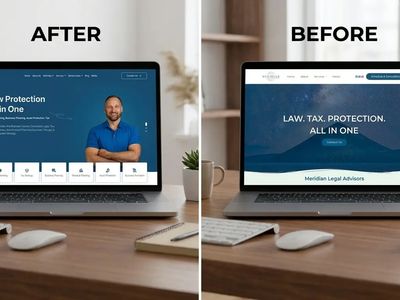
Meridian Legal Advisors
We gave their website a complete overhaul which improved credibility, clarified services, and streamlined the conversation of clients with a structured and user-friendly layout.

StoneBridge Law Firm
A conversion-focused personal injury law firm website designed to build trust, simplify urgent user journeys, and guide visitors toward legal consultation through modern UX, strong visual hierarchy, and credibility-driven design.

Frequently asked questions about Secure Redaction
Still have questions? Contact our team via ask@timetechnologiesllc.com
Is Secure Redaction really free?
Yes. The core redaction tool at secureredaction.com is free to use. There is no account required, no login, no trial period, and no feature gate. You open the URL, select your document, redact it, and download the output. We may introduce premium features for high-volume enterprise workflows in the future, but the core client-side redaction capability is and will remain free.
What file formats does it support?
Currently, Secure Redaction processes PDF documents, which is the standard format for court filings, discovery productions, and legal document exchange. Support for Word documents (DOCX), scanned image PDFs via OCR, and image files (TIFF, PNG, JPG) is on the development roadmap.
Does it work offline?
After the initial page load, the Rust/WebAssembly engine is cached in your browser. Subsequent visits load faster. The redaction processing itself does not require an internet connection because there is no server communication during the redaction operation. However, the initial page load does require a connection to download the WASM module.
Can I use it on my phone or tablet?
Secure Redaction runs in any modern browser, including mobile browsers. However, the document review and manual redaction selection workflow is optimized for desktop and laptop screen sizes. We recommend using a desktop or laptop browser for the best experience, particularly for large documents where precise redaction box placement matters.
How does it handle scanned PDFs?
Scanned PDFs with embedded text (created by OCR-capable scanners) are processed normally. Image-only scanned PDFs without embedded text are on the OCR roadmap but are not currently supported for automated PII detection. You can still open image-only PDFs and apply manual redaction boxes over any visible content.
Is the redaction truly permanent?
Yes. Secure Redaction performs permanent redaction that removes the underlying text from the PDF’s content streams, strips associated font data, and scrubs document metadata. The redacted content cannot be recovered by selecting text beneath the black box, by opening the file in a text editor, by parsing the PDF’s content streams, or by any other means. This is the level of permanence required by Federal Rule of Civil Procedure 5.2 and most state court e-filing rules.
Can I redact multiple documents at once?
The current version processes one document at a time. Batch processing for multi-document production sets is on the development roadmap. For discovery productions requiring redaction of dozens or hundreds of documents, we recommend processing each document individually in the current version. Processing time per document is under thirty seconds for most legal files, so even a substantial production set can be completed in a single session.
Who built this tool?
Secure Redaction was built by Time Technologies LLC, a digital agency specializing in technology solutions for law firms. We identified client-side document redaction as a gap in the legal tech market during our work with immigration, criminal defense, and personal injury firms whose confidentiality requirements could not be satisfied by cloud-based alternatives. The tool is built on Rust and WebAssembly because these technologies provide the security and performance characteristics that legal document processing demands.
How is this different from Adobe Acrobat’s redaction feature?
Adobe Acrobat Pro has a redaction feature that performs permanent redaction, but it requires a paid desktop software license ($22.99/month per user), installation on each machine, and IT involvement for deployment and updates. Secure Redaction provides permanent redaction in a browser with no installation, no license cost, and no IT overhead. For firms that already have Adobe Acrobat Pro deployed across all workstations, Adobe’s redaction works. For firms that need a lightweight, zero-cost, zero-install alternative that any team member can use immediately, Secure Redaction is the faster path.

MyCase Pricing & Tier Comparison: Pro vs. Advanced for Growing Law Firms

The 15-Point Family Law Marketing ROI Checklist

The Best Legal Intake CRMs for Law Firms in 2026