

Law Firm Software Integration and Workflow That Stops the Double Entry
A client signs. Then someone types their details into the practice management system, again into the document templates, and a third time into the billing tool. Every retype is a chance to introduce an error, and none of it is billable work.
We will connect the systems your firm already runs so a matter is created once and flows to the places that need it. Your team stops needing to manually bridge and double-check.

One Client Record across Your Firm's Existing Systems
This service is for firms where the same client information is entered more than once, and where the reports you find it hard to trust matter the most.
We connect your practice management system to your intake process, your document templates, and your billing so matter data is entered once and used everywhere. We also pull matter and billing data out into reporting you can act on, without an export ritual repeated every month.
We work with the system your team already knows and leave your records where they are. Nothing about your current setup ever gets replaced.
What Your Firm Gets
Connect your core systems to reclaim billable hours, prevent errors, and centralize matter data.

The matter is created once
A signed retainer becomes a matter with the right parties, fields, and template attached. Nobody has to re-type the client's details.

One client, one record
One client is not repeated differently in three softwares. Your team sees a complete picture when you search them up.

Transparent and complete reporting
Matter, time, and billing data comes out of the integrated system your firm does all its work in, so the numbers always match what happened.

Visibility is tightly controlled
We map who needs to see revenue, who needs to see time, and who does not, before we build anything.
Practice Areas We Serve
Back office work looks different in every practice area. These are the six we work with most.

Family Law
Document-heavy by nature. Financial affidavits and custody schedules are where retyping costs the most time.

Personal injury
Medical records, lien letters, and settlement documents pile up fast. Files need to be assembled without manual chasing.

Criminal defense
Court dates move. Deadline alerts that fire on their own are the difference between prepared and panicked.

Immigration
Form accuracy is everything, and the same client data populates many forms. Enter it once and it should flow everywhere it is needed.

Bankruptcy
Chapter 7 and 13 asset tracking, means testing, and credit counseling deadlines all depend on data being in one place.

Estate planning
Steady document production with long client relationships. We will tell you honestly if this service is not the priority for your firm.

From signed retainer to reporting, without the retyping


"They took the time to understand our goals, listened to feedback, and made thoughtful recommendations that have significantly improved the overall design and user experience."
”Our Process
A proven approach that delivers results
Access review
We look at your practice management system and the tools around it, and confirm what your current plan will allow us to connect.
Find the duplication
We follow one client from signed retainer to final invoice and count how many times their details are entered.
Verify what to keep
Before building, we agree on which records are the sources of truth and who should be able to see what.
Build and test
We connect your systems, run real matters through the path, and check that the records are correct at every stage.
Handing over
You get written documentation of all connections and work so that your team can maintain the basics.

Find out what the double entry is costing you
Bring us one recent client and we will trace their record with you. We will count how many times their details were typed in over and over, and show you what the systems would need to do instead. This will be over a 30 minute call and there is no commitment.

Frequently Asked Questions
What a practice management system covers
Practice management is a broader term than most firms realise. It covers three jobs that are often handled by three different tools: the matter and its documents, the time and expenses that go into it, and the billing and trust accounting that come out of it.
When those three jobs are dealt with separately, your client record multiplies. When they live in one system, integration becomes much simpler, because there is only one place for data to be kept.
Why a signed client still gets typed in twice
It happens because each system has its own idea of what a client is. It’s called a lead with the intake software, a template merge with your document system, and a payer with billing.
The fix is to decide which record to use as the primary, usually the practice management system, and then connect the others to it. Once that is set, the other systems read from it instead of asking a person to retype it.
Getting matter and billing data out for reporting
Most practice management systems will produce a report that is not useful all on its own. That is where manual exports begin.
We take the data out of your system of record and put it where it can be combined with other data, for example marketing spend or client acquisition cost. The report then reflects something much more whole, transparent and useful to you.
Who can see what, and why
Legal software usually has two layers of access: what a connection is allowed to do, and what each person’s role allows them to see.
Imagine a firm administrator without billing access. A connection may mean the system is integrated and working as intended, but the admin is simply not allowed to see that.
We map this before we build. It avoids the most common disappointment in a project like this: a technically correct implementation that ends up not being useful.
Which systems we connect
We work with the practice management and case systems your firm already owns, including:
Clio Manage, MyCase, Smokeball, PracticePanther, Filevine, Actionstep, CosmoLex, Rocket Matter, CARET Legal, PCLaw, MerusCase, CASEpeer, DocketWise, SurePoint, and Litify.
For document management at larger firms we also work with NetDocuments and iManage.
If your system is not on this list, ask us. Most systems with an open connection can be reached, and we will tell you clearly if yours cannot.
What we need from your team
Access to your practice management system, one person who knows how a file moves through your firm, and 30 minutes to trace a real matter with us. We do the rest and document it all for you.
The workflows we automate after the client signs
These are the steps we will be able to take off your team's plate once a client is signed.
- Matter opening: a signed retainer creates the matter with the correct parties, fields, and template attached.
- Document assembly: the right documents are generated from the matter's data, ready for review and signature.
- E-signature and filing: agreements go out and come back signed, and the signed copy files itself to the matter.
- Deadlines and calendar: court dates and limitation periods create calendar entries and alerts without anyone re-entering them.
- Time and expense capture: time entries and disbursements attach to the right matter as the work happens.
- Billing and trust: invoices generate from the matter, payments reconcile, and trust entries stay in order.
- Reporting: matter, billing, and realisation data report from the record of truth rather than a manual export.
- Receiving the handoff: the client arrives from your intake process with their source data intact. See our CRM integration service for that side of the process.
Featured case studies
Real firms, real numbers. See what the right content and systems delivered.
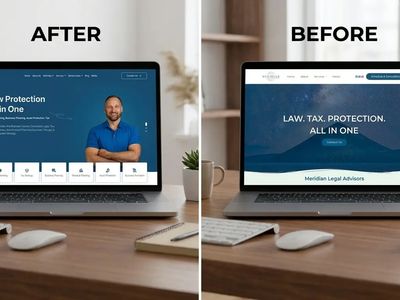
Meridian Legal Advisors
We gave their website a complete overhaul which improved credibility, clarified services, and streamlined the conversation of clients with a structured and user-friendly layout.


Zahid Law – Family Law Firm Toronto
We transitioned the website from "bloated" to a high-performance engine, increasing search visibility, optimizing engagement, streamlining consultation, and enhancing conversation rate.

A Case Study For Bick Law LLP
We built a high speed law firm website demo with built-in lead qualification and Clio-integrated client portal, improving efficiency and reducing paralegal costs.

Frequently Asked Questions
Still have questions? Contact our team via ask@timetechnologiesllc.com
What does practice management integration cost?
It depends on how many systems are in the chain and what each one allows. A firm connecting intake to one practice management system will be a simple build. A firm connecting documents, billing, trust accounting, and a reporting layer can be a larger one. We only quote after the access review, because a system that restricts its connections changes the work involved.
How long does it take?
Most builds go live within a few weeks, and we usually connect the path in stages so your team is never without a working process.
Will this disrupt our existing setup?
We design for it not to. Your practice management system stays as it is and your records stay where they are. We add the connections between systems rather than moving your data.
Do you work with solo firms?
Yes, and the gains can be immediate. A solo practitioner is often the person doing the retyping, so removing a duplicate step gives back their own time rather than someone else's.
What about boutique firms?
Boutiques usually have a document problem more than a volume problem. Automating template assembly and deadline tracking is where the time comes back.
And mid-sized firms?
Mid-sized firms usually have several people touching the same matter and no shared rule about which system holds the truth. The work here is agreeing on the rule first, then automating it so it holds even when someone is absent.
Do we have to replace our practice management system?
No. We do not sell software, and we do not earn anything from recommending one system over another. If your current system genuinely cannot do what you need, we will tell you, but that is a separate conversation from this service.
Who owns the integration?
You do. We build it, document it, and hand it over.
What happens after I book?
We have a 30 minute call. You describe to us how a file moves through your firm today and which systems are involved. We ask for access, trace a real matter, and come back with what we would connect and what it would cost. No commitment and no obligation to proceed.

MyCase Pricing & Tier Comparison: Pro vs. Advanced for Growing Law Firms

The 15-Point Family Law Marketing ROI Checklist

The Best Legal Intake CRMs for Law Firms in 2026