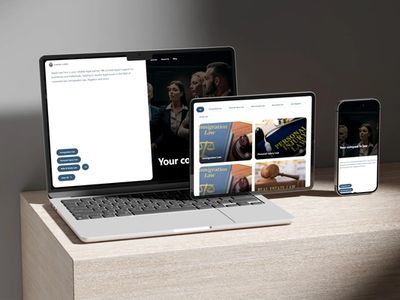
18 Hours to 30 Minutes
Building an AI operations layer for Myers, a personal injury firm

Summary
Myers is a personal injury law firm. They handle car accidents, slip-and-fall cases and premises liability. Staff were spending most of their day on paperwork instead of on clients.
Each case took 15 to 21 hours of administrative work, and the largest part of that was the medical records. One person would read through the file and build a treatment timeline by hand, which took 10 to 15 hours per case on its own.
We designed and built a connected set of tools to handle phone calls, client intake, medical records, demand packages, case management and client follow-up. The system works in English, Spanish and Haitian Creole.
In a pilot across five cases, the time to put a demand package together fell from about 18 hours to about 30 minutes.
The firm had no case management system, so we built the whole structure from scratch, and one of the three languages turned out to be unsupported by every voice vendor we could find. The most expensive task in the workflow, reading the medical records, is also the one task the software does not do.
Results
Five cases, measured from start to finish.
| Task | Pure manual | Lawmatics + Filevine (DocGen) | Lawmatics + Filevine + AI extractor |
|---|---|---|---|
| Intake to file creation | 2 to 3 hours | Instant | Instant |
| Medical summaries | 10 to 15 hours | 10 to 15 hours (still manual) | 20 to 30 minutes |
| Drafting and formatting | 3.2 hours | 10 minutes | 5 minutes |
| Total per case | 15 to 21 hours | 10 to 15 hours | 25 to 35 minutes |
Pilot results from 5 cases. These are working times, not waiting times.
What the middle column shows
Buying the right case management software fixes two of these three tasks. Intake becomes instant, and drafting goes from 3.2 hours to 10 minutes. Both are real wins, and neither one needs AI.
The same software does nothing for medical summaries. That work stays at 10 to 15 hours per case, because someone still has to read a thousand pages for each one.
That is the task we took on. The software handles the other two.
What it means at scale
Over 200 cases a year, the same saving adds up to 2,000 to 3,000 hours, which is one full-time employee freed up for work that needs a person.
Other tools that cut admin time in a law firm are covered in 8 AI tools saving 10 or more hours a week.
Requirements
Six areas of work, plus four rules that applied to all of them.
| # | Area | What it covers |
|---|---|---|
| 1 | Phone reception | Answering 24/7, language choice, identifying who is calling, routing, appointments, taking messages, transferring to staff |
| 2 | Client intake | Structured conversations, working out the claim type, conflict checks, booking consultations, generating documents and getting them signed |
| 3 | Medical records | Listing providers, requesting records, chasing them, receiving and sorting them, pulling out the facts, building the treatment timeline, tracking costs |
| 4 | Demand packages | Gathering case data, summarising records, building the timeline, putting exhibits and an exhibit index together, approval, exporting to Word and PDF |
| 5 | Case management | Creating cases, assigning tasks, tracking stages, watching deadlines, spotting stalled cases, dashboards |
| 6 | Client updates | Status updates, appointment reminders, document requests, sending legal questions to staff |
Four rules applied to every part of the build.
- Three languages everywhere. Phone calls, intake and written messages.
- No invented facts. Drafts could not carry made-up findings, dates, costs or legal arguments.
- Everything is traceable. Every claim in a draft has to point back to the records.
- Attorney oversight. The AI drafts, and a qualified person decides.
Rules 2 and 4 set a high bar for the project. A demand letter that sounds right is not enough, because every claim in it has to be checkable against the source page.
Challenges
1. Haitian Creole has no voice
The firm needed three languages. English and Spanish were straightforward to support, but Haitian Creole was not.
We checked nine speech vendors: OpenAI, Google, Microsoft, Amazon, ElevenLabs, PlayHT, Retell, Smith.ai and Azure's translation service. None of them could speak Haitian Creole.
Several could understand it. OpenAI's Whisper can transcribe Haitian Creole, so the words coming in were fine. But none of the vendors could speak it back, at any price.
Voice cloning is the usual workaround, and it does not help here. Cloning copies how a voice sounds. It does not copy the words a language uses. To pronounce Haitian Creole, the system needs a Haitian Creole sound set, and without one a cloned voice still reads Haitian Creole text using French or English sounds.
This is a gap in the market, and no configuration setting can work around it.
So we split the job in two. A live bilingual agent takes the call, and everything around the call still runs automatically: transcription, intake notes, creating the client record and follow-up. The caller speaks to a person, while the system behind that person is software.
The same approach runs in our AI chatbots and voice agents service.

2. The software does not do the hardest task
The pilot data confirmed this. Myers bought software that fixed intake and drafting, and it did nothing for the medical records. Reading a thousand pages and building the timeline stayed manual, on every case.
That is where our work added value. The tasks the software already handled needed nothing from us.
3. Reading the records and proving where they came from
The firm could not risk invented facts, so we could not simply feed records into a language model and trust what came out.
What we found was that Filevine indexes the text inside documents, including text pulled from scans and faxes using OCR. A content search returns the matching documents with page numbers, highlighted quotes, and a link that opens the document at the right page.
That solved two problems at once. We could find what we needed inside a stack of scans, and the attorney could click any line in the draft and land on the page it came from.
The search only returns the pages that match, though, and never the whole document. So we download the files and read them in full. We use search for finding and citing, and downloading for reading.

4. The rule that decided the design
In Filevine, a note has to be attached to a case. A contact can exist on its own.
That difference is one of the things that separates legal intake CRMs from each other, and it decides how a firm's data can be structured.
That created a problem, because a possible client who has called but not signed yet has no case. There was nowhere to record their calls, texts or progress.
The case system was never built to hold that data, so we gave the pre-signing stage its own system and drew a clear line at the point of signing:
Everything before signing lives in one system. Everything after signing lives in the other.

5. The sync leaves the activity behind
The two systems can sync with each other, but only in one direction, and only data. The sync does not carry tasks, texts, call history or pipeline changes.
The same limit shows up in most law firm CRM integration projects, where a lead record and a client record do not share their history.
So the handoff works, but the history does not come with it. When a caller becomes a client, the calls and messages that led to hiring the firm would be missing from the new file.
We fill that gap ourselves. When the client signs, we move the history across, so the attorney opens the case and sees the whole relationship, including everything that happened before signing.

6. There is no document assembly API
Filevine sells a document assembly product that builds demand letters in one click. It has no API.
We went through the whole list of 44 endpoints, and none of them covers templates or document generation. The product only works when a person clicks a button in the interface.
So building, exporting and sending the document was our job. The case management system gave us storage, version history, search and an approval step. The document itself was ours to produce.

7. Medical data passes through four vendors
Medical records and client details would pass through four different vendors, and every vendor is another place where data can leak.
Most setups connect systems with a hosted automation service. We did not use one, because the data moving between systems contains medical information, and a hosted service would send that data through someone else's servers on every event.
Instead, we run the automation layer on our own servers, so the data stays inside a system we control.
8. Starting from nothing
Myers had no case management system, so nothing needed to be moved in. That part was simple.
What was not simple is that starting from nothing means building every case type, workflow stage, custom field, data structure and template before any automation can run.
On top of that, every structural change in Filevine is marked beta. That means it works for daily use, but the vendor can still change how it behaves.
The result is that the riskiest part of the project was the beginning, which is also the part that is easiest to overlook.
Building that structure is part of our operations work for law firms, and it happens before any automation is switched on.
Our Solution
The stack
| Layer | Product | Role |
|---|---|---|
| Front door | CallRail | Phone number, menu, recording, call tracking, English and Spanish transcripts |
| Voice, English and Spanish | Vapi | Runs the voice agent |
| Voice, Haitian Creole | Bilingual human agent | The only way to speak the language |
| Case record | Filevine | Holds the case |
| Before signing | Lawmatics | Pipeline, forms, consultations, text and email |
| Automation | n8n, self-hosted | Every connection, on our own servers |
| Extraction and assembly | Our layer | The work no vendor does |

The rule behind the design
One rule, and most of the design follows from it. It came from a limit in the platform, and it is also why the system can hold both callers and clients without either getting in the way.
How we answered each challenge
| Challenge | What we did |
|---|---|
| Haitian Creole voice | A bilingual person speaks, and the AI still transcribes, structures and files everything else |
| Medical summaries | Our extractor reads the indexed text of the records |
| Traceability | Search returns page-level citations the attorney can click |
| Nowhere to keep pre-signing data | Two systems and one clear line, drawn at the point of signing |
| Sync carries no activity | Our own activity router moves it across |
| No assembly API | We build the package |
| Four vendors touch medical data | We host the automation ourselves |
| A beta platform | Build the structure first, then freeze it before automations depend on it |
What We Learned
Work on the part no product covers. The medical timeline was the task that no product touches, and it was the biggest block of manual work in the practice. That is where the effort went.
Confirm language support before designing anything. We checked nine vendors and none of them supported Haitian Creole. Finding that out took a day, and it changed the whole design of the phone system. Assuming it would work would have cost us six weeks.
A platform limit can become a rule. At first, the requirement that a note needs a case looked like an obstacle. Treated as a boundary instead, it produced the cleanest rule in the design.
Separate what the software did from what we did. The pilot table shows the software fixing intake and drafting, and it shows where that stopped. Keeping the two apart is what makes the numbers believable.
Work With Us
Myers had a gap between the software that ran their cases and the work that filled it. Most firms have a version of it.
We connect the intake sources a firm already pays for to the CRM it already owns, so every inquiry arrives with its source attached. Nothing about the CRM changes.
See how law firm CRM integration works, or book a free strategy session and we will trace one of your recent leads with you.
Technical Appendix
For engineering readers. These findings come from the platform's own API documentation.
Two ways to upload, four ways to finish
Documents get into Filevine one of two ways, and each route needs a different step to finish. If that step is skipped, the document stays pending and never appears in a list.
| Batch upload | Single upload | |
|---|---|---|
| Files per call | Many | One |
| Upload link lasts | 24 hours | 5 hours |
| Size field unit | bits | bytes |
| Finish with | Batch confirmation | Add Document to Project |
Four endpoints can finish a document, and using the wrong one fails without any message. Multipart uploads have to be finished through their own endpoint.
Revisions reverse the rule
To add a new version of a document, use the single upload path, and the new file has to be uploaded but not finished. Finishing it first produces an error.
This is the opposite of the normal upload flow, where failing to finish is the mistake. The two paths have opposite rules.
Units change from endpoint to endpoint
SizeInBits is measured in bits, while Size everywhere else is measured in bytes. Chunk sizes always come back in bits.
If one conversion function is written and reused, one of the two flows breaks without warning. A file size that is eight times wrong does not throw an error; it fails later, during validation.
Access levels change by endpoint and by query
The same endpoint can need different permissions depending on how it is called.
A document list with no filter needs admin access across the whole organization, while the same call filtered to one case needs only guest access. Content search needs more access than document listing, and returns a permission error if the account is set up below that level.
So the access level of the integration account is a question that can stop the build, and it needs settling before any work starts.
Rate limits are reported at runtime
Limits are set per API tier, in separate buckets for different groups of endpoints. Two response headers report the current allowance: the maximum, the refill rate, a 60-second window and the tier name. A request that arrives with no allowance left returns a too-many-requests error.
There is no need to hard-code a limit. The right design reads the remaining-allowance header and slows down before it reaches zero, which is better than asking the platform for a number.
One encoding mistake that fails quietly
Tag filters need the hash character written as %23. Without it, most HTTP clients drop the filter before the request is sent, so the query returns unfiltered results and nothing reports a problem.
What we would ask a platform before starting
- Which host do we build against, and is there a region distinction?
- What access level and scopes can a machine account hold?
- Which structure changes are beta, and how much notice do we get before a change?
- Is there a sandbox tenant?
- What are the rate limits, and can they be raised?
See where your leads actually stop
Myers needed the history of a caller to survive into the client file. That is one version of a problem we solve for law firms every week. We connect your website, ads, phone calls and chat to the CRM you already use, and we keep the source attached to the lead.
See how CRM integration worksMore Success Stories
Tailored strategies that address the unique challenges of your practice area
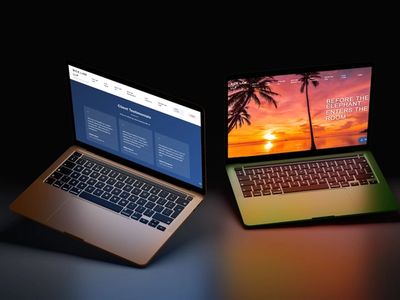
A Case Study For Bick Law LLP
We built a high speed law firm website demo with built-in lead qualification and Clio-integrated client portal, improving efficiency and reducing paralegal costs.

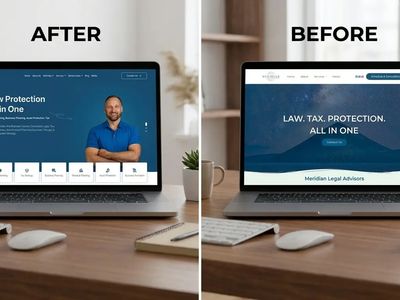
Meridian Legal Advisors
We gave their website a complete overhaul which improved credibility, clarified services, and streamlined the conversation of clients with a structured and user-friendly layout.
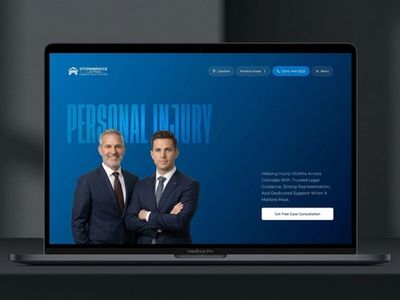
StoneBridge Law Firm
A conversion-focused personal injury law firm website designed to build trust, simplify urgent user journeys, and guide visitors toward legal consultation through modern UX, strong visual hierarchy, and credibility-driven design.